How to Build a Feature Scoping Skill for Claude
Jan 16, 2026
Zihan Wang, Tamer El-Hawari
When you prompt Claude with "write me a PRD for [feature idea]," you're asking for a document that spans multiple distinct responsibilities. Problem framing requires deep understanding of user pain points. Scoping demands clear thinking about boundaries and trade-offs. Specification needs technical precision. Each of these tasks has different inputs, different success criteria, and different reasons to change over time.
Generic prompts produce generic output because the AI has no way to know which parts matter most to you.
Product managers who've experimented with AI-assisted PRD writing report that while AI can speed up initial drafting significantly, the output requires substantial human oversight. The solution isn't to abandon AI—it's to break the workflow into focused phases where AI can excel.
Think about how effective scope management is product management. Every day, you're parsing questions about what's in and what's out. Should you include that extra feature in v1? Where do you draw the boundaries? These decisions are tiring precisely because they're high-stakes. They deserve focused attention—not a single section buried in a 20-page document.
What Is the Single Responsibility Principle?
The Single Responsibility Principle comes from software engineering. Robert C. Martin, who coined the term, puts it this way: "A class should have only one reason to change." He later clarified the idea further: "Gather together things that change for the same reasons. Separate things that change for different reasons."
Applied to AI workflows, this principle suggests that a skill should handle one well-defined task exceptionally well. Instead of building a "PRD skill" that does everything, you build separate skills for each phase of the work: shaping (why this matters), scoping (what's in and out), and specification (how it works).
This post focuses on scoping—the phase where you figure out what's included in your first version before you write detailed specs. Scoping is particularly well-suited for AI assistance because it benefits from structured thinking, clear frameworks, and systematic exploration of options. These are areas where Claude excels when given proper guidance.
How Are Claude Skills Structured?
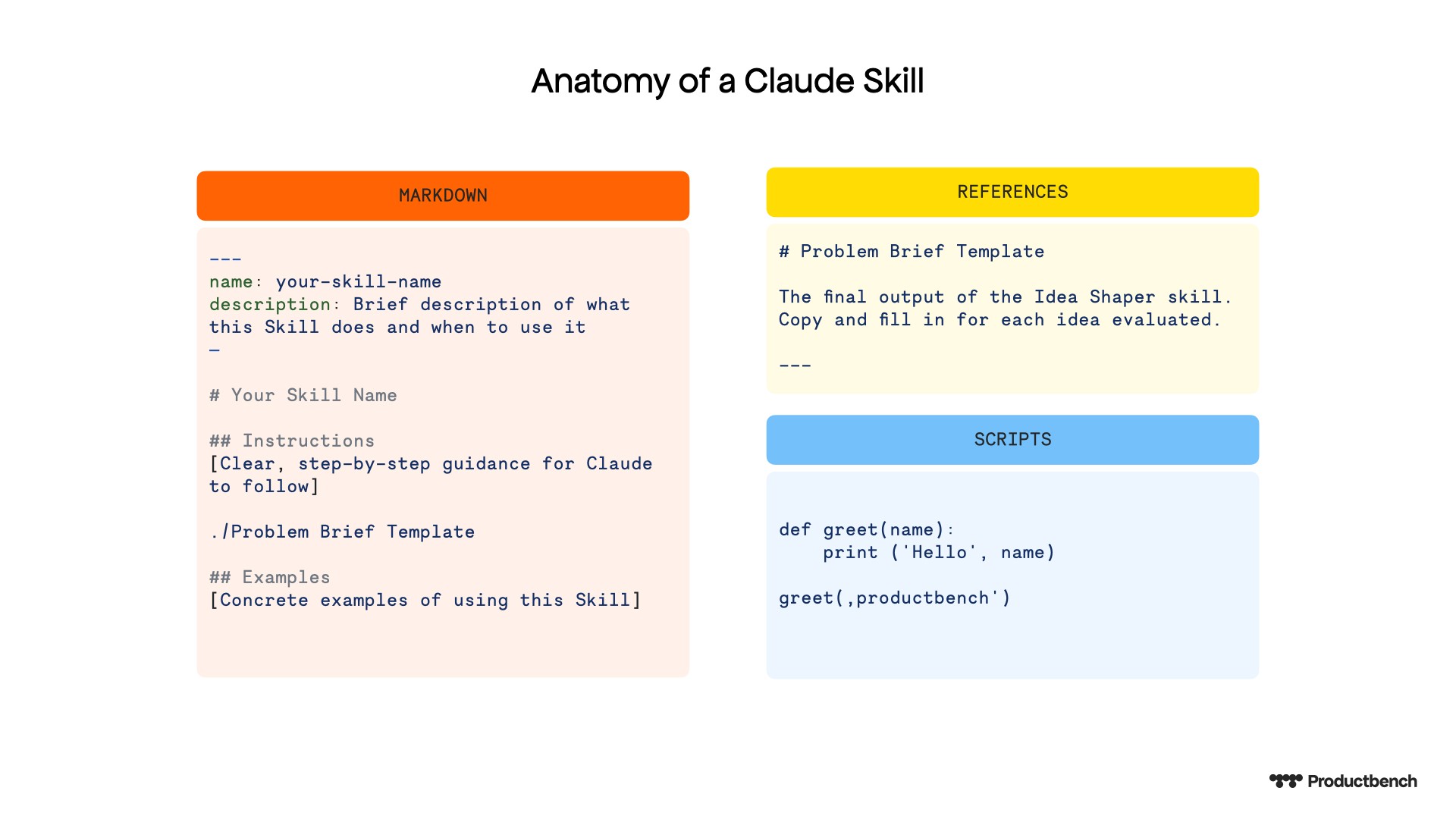
Claude Skills are folders containing instructions, reference files, and optional scripts that Claude loads dynamically when they're relevant to your task. When Anthropic introduced Agent Skills, they described them as "custom onboarding materials that let you package expertise." The key insight is that skills are composable as multiple skills can work together and portable, using the same format across Claude apps, Claude Code, and the API.
Every skill needs a SKILL.md file with two required elements in its header: a name and a description. The description is critical because Claude uses it to determine when to invoke your skill. A vague description means your skill won't activate when you need it.
The body of the SKILL.md file contains your instructions in plain Markdown. According to Claude's skill creation documentation, you can also include reference files (templates, examples, guidelines) and executable scripts for tasks where traditional code is more reliable than AI generation.
The Interaction Model
The part most people skip is defining how AI should collaborate with you, when you get asked and when the AI can assume answers. There are different modes of interaction that you can add to your file.
Proof required means AI suggests, you approve. Use this for scope decisions where your judgment is essential.
AI assumes means AI decides and informs you. Use this for structural choices like formatting.
Socratic means AI asks clarifying questions before proceeding. Use this for problem definition where you may not have articulated everything yet.
Retrieve means AI pulls from context or past conversations. Use this when you've already documented relevant information elsewhere.
Check out the skill.md file in the feature-scoping-skill by unzipping it on how to add a dynamic interaction model for your other skills.
Building Your Feature Scoping Skill Step-by-Step
Creating a skill doesn't require writing files manually. Claude has a built-in skill-creator that handles the structure for you. Here's the process.
Enable Skills and the Skill-Creator
In Claude settings, navigate to Capabilities and enable Skills. You'll see Anthropic's pre-built skills and the option to upload custom ones. The skill-creator skill is available to guide you through building your own.
Answer Two Questions
Start a conversation with Claude and say something like "I want to create a skill for feature scoping." Claude will ask you two fundamental questions: What should this skill do? What should the result look like?
For a feature scoping skill, you might answer: "This skill helps me break down a feature idea into scopeable components with clear boundaries. The result should be a markdown document with a hierarchical breakdown, scope boundaries (what's in v1 vs. later), user stories with acceptance criteria, and t-shirt size estimates."
Walk Through the Generated Structure
Claude will create a folder containing your SKILL.md file, organized into sections for workflow steps, output format, and any reference materials. Review it carefully. The initial version is a starting point, not a finished product.
Iterate Two to Three Times
Expect to refine the instructions. Test the skill with a real feature idea, notice where the output falls short, and ask Claude to update the skill accordingly. Common refinements include adding constraints ("always ask about technical dependencies"), adjusting the output format, or including examples of good scope boundaries.
What the Skill Produces: A Real Example
Here's what happens when you use a well-designed feature scoping skill. You provide a three-line feature idea: "I want users to upload images of themselves and see how they'd look wearing different clothes from our catalog."
The skill activates and Claude asks clarifying questions: What's the primary user goal? Are there technical constraints? What's your timeline? Then it produces a structured scoping document.
Feature overview: Virtual try-on for catalog items using uploaded user photos.
Component breakdown: The skill identifies distinct pieces like image upload and processing, body/pose detection, garment overlay rendering, catalog integration, results sharing. Each component gets its own section with dependencies noted.
Scope boundaries: The skill explicitly separates what's in v1 (single image upload, top-5 catalog items, basic overlay) from what's deferred (video try-on, full catalog access, social sharing). This is the minimum viable version - the smallest version that still delivers material value.
User stories with acceptance criteria: Each story follows a standard format with clear conditions for "done." For example: "As a shopper, I can upload a photo of myself so that I can see how clothes would look on me. Acceptance criteria: Supports JPG/PNG up to 10MB, processes in under 5 seconds, shows error state for unsupported formats."
Effort estimates: T-shirt sizes (S/M/L/XL) for each component, with notes on what drives complexity.
The entire process takes about 15 minutes of back-and-forth. Compare that to hours of manual work, and the value becomes clear. But here's the important caveat: this is an 80% draft. Plan 30 minutes to review and catch gaps. Your domain expertise is what turns AI output into something your team can actually build from.
Taking It Further: From Scoping Document to Prototype
A well-structured scoping document becomes the foundation for everything that follows. You can use it as input for creative exploration. Just ask Claude to reimagine the feature from a different angle. "How would Steve Jobs approach this? What would make it feel magical instead of merely functional?"
This reframing shifts you from feature lists to user experiences. The scoping document ensures you don't lose the practical constraints while you explore.
You can also feed the scoped output into prototyping tools. Services like v0, Lovable, or bolt.new can take structured requirements and generate working interfaces. The scoping document gives you the foundation - turning raw ideas into concrete direction - while creative tools build on top.
What You Can Do Now
The Single Responsibility Principle isn't just for code. Applied to AI workflows, it means building focused skills that do one thing exceptionally well. A feature scoping skill handles the messy work of breaking down ideas into buildable pieces, leaving you free to make the judgment calls that matter.
Download the feature scoping skill referenced in this post, adapt it to your team's workflow, and share what works. Skills get better when they're shaped by real use.
Ready to master AI for product management? Join the waitlist for our upcoming "Master AI for Product Management" course and stay ahead of the curve.
Back to Overview